Conditional Messages
A static message in Airport Conditions or NOTAMs can be included in the ATIS only while certain things are true, instead of being switched on and off by hand. There are two kinds of condition, and a message can use both:
-
Controllers online: include the message only while specific VATSIM controllers are online or offline, such as
LAX_GND AND NOT LAX_DEL. The same box can also limit a message to certain hours in Zulu, such as2200z-0600z. -
Weather: include the message only when the METAR meets a condition you write, such as
ceiling < 200ft.
Typical uses are a frequency NOTAM that depends on whether Delivery is staffed, and a Low Visibility Procedures in operation airport condition that follows the weather.
Conditions are set in the message editor, which opens when you add a message with New or change one with Edit in the Airport Conditions or NOTAMs dialog. A message with no conditions is always included. A message whose checkbox is not selected is never included, whatever its conditions say.
When both kinds of condition are set, both must be met for the message to be included.
The Airport Conditions and NOTAMs lists show each message’s conditions under its text, in smaller italic type, so you can see which messages are conditional without opening them. Messages without a condition show only their text.
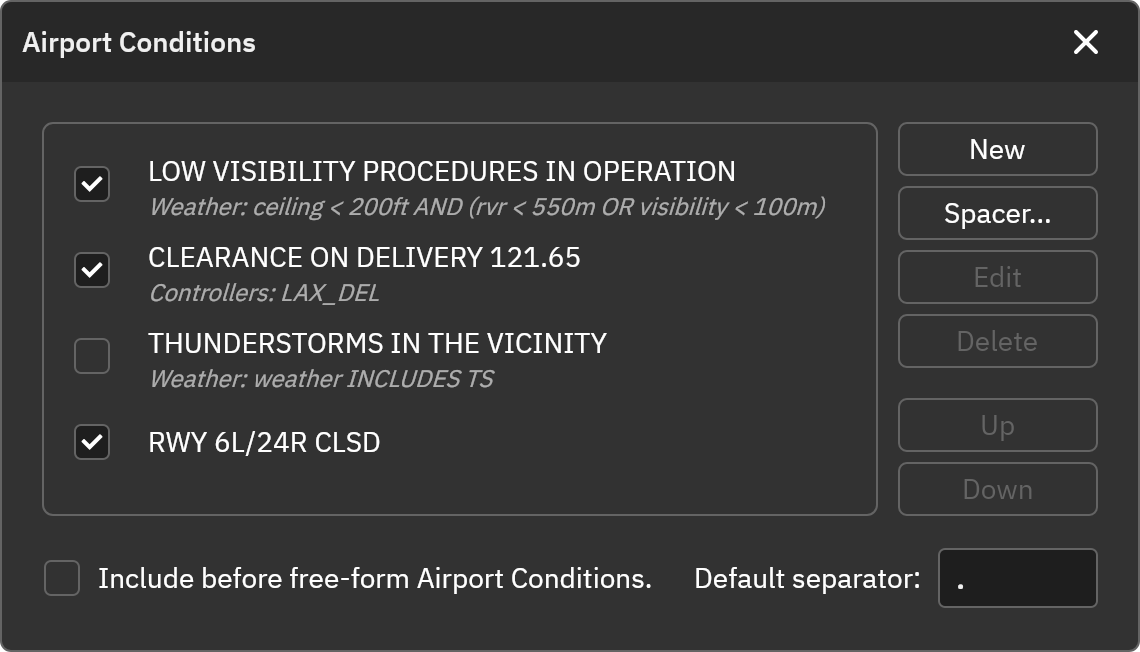
A checked message that has a condition is included in the ATIS only while its condition is met, so a checked row in the list does not always mean the message is being broadcast.
Controllers Online
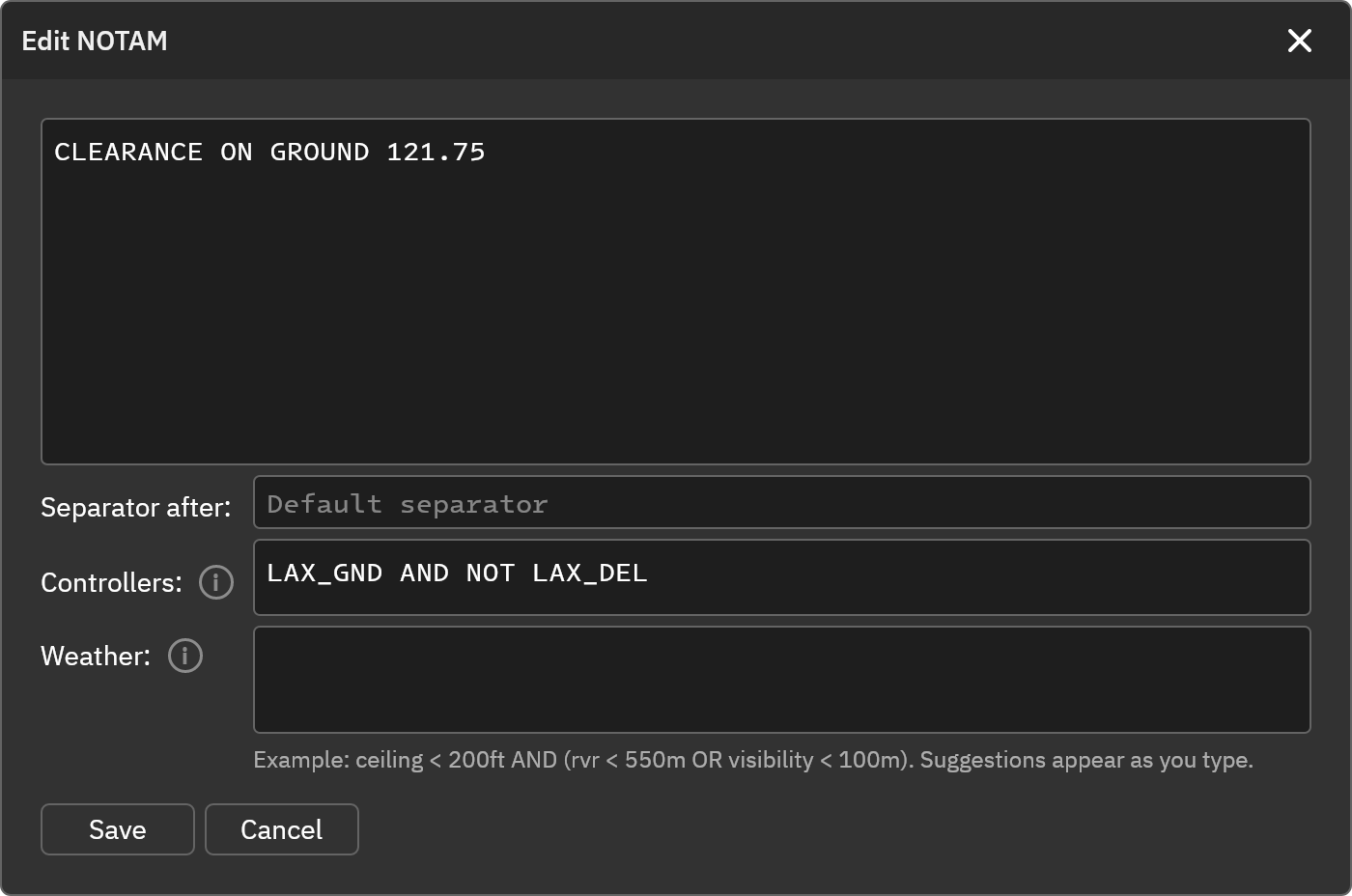
Type a condition in the Controllers box. The message is included while the condition is met. A message with an empty Controllers box is not affected by which controllers are online.
The simplest condition is a callsign, such as LAX_DEL, which is met while that controller is online. Join callsigns with AND and OR, negate one with NOT, and group them with parentheses:
LAX_GND AND NOT LAX_DEL
That is met while Ground is online and Delivery is not. Keywords are not case-sensitive, and the condition can be spread over several lines. Callsigns are not case-sensitive either, and the whole callsign must match. Use * as a wildcard for any run of characters:
| Entry | Matches |
|---|---|
LAX_DEL | Only LAX_DEL
|
LAX_N_TWR, LAX_S_TWR | Either callsign |
LAX_*_CTR |
LAX_25_CTR, LAX_26_CTR, … (but not LAX_CTR, which has only one underscore) |
LAX_*CTR |
LAX_CTR, LAX_25_CTR, LAX_26_CTR, … |
LAX_* | Any LAX_ position, including Tower and Ground |
A wildcard callsign is met while any controller matching it is online. Observers and ATIS connections are not counted as controllers.
Combining callsigns
Callsigns written one after another, separated by commas or spaces, mean any of them, so LAX_N_TWR, LAX_S_TWR is the same as LAX_N_TWR OR LAX_S_TWR. A NOT straight after a callsign means AND NOT, so LAX_GND NOT LAX_DEL is the same as LAX_GND AND NOT LAX_DEL.
AND is evaluated before OR, as in ordinary logic, so
LAX_TWR AND LAX_GND OR LAX_DEL
means (Tower and Ground) or Delivery. Use parentheses to change the order:
LAX_TWR AND (LAX_GND OR LAX_DEL)
NOT applies to the callsign or group that follows it: NOT (LAX_N_TWR OR LAX_S_TWR) is met while neither is online. If the condition is not valid, vATIS shows what is wrong and where, and will not save the message until it is fixed.
Time of day
A condition can include a range of Zulu (UTC) time, written as a start and an end: 0700z-1400z. The z is optional and spaces around the dash are allowed, so 0700 - 1400 works too. The range is met from the start time up to, but not including, the end time, so 0700z-1400z is met at 1359Z and not at 1400Z.
If the end is before the start, the range crosses midnight. 2200z-0600z is met from 2200Z until 0559Z. Use 2400z as an end time for a range that runs to midnight, such as 2000z-2400z.
A time range works like a callsign in an expression, so it can be combined with them:
| Controllers | Met |
|---|---|
2200z-0600z | Between 2200Z and 0600Z, whoever is online |
LAX_TWR AND 0700z-1400z | While LAX Tower is online, between 0700Z and 1400Z |
0700z-1400z OR 2200z-2300z | In either range |
NOT 0700z-1400z | Outside 0700Z to 1400Z |
A message limited to certain hours, such as Noise abatement procedures in effect overnight, can use a time range alone. vATIS checks the time every 5 seconds, so a message can appear or disappear up to 5 seconds after the range starts or ends, and the ATIS is rebuilt when it does. The ATIS letter is not advanced by these changes.
Suggestions
As you type, vATIS suggests AND, OR and NOT where they can go: NOT where a callsign is expected, and all three after a callsign or a closing parenthesis. The list appears as you type a word, after a space and after an opening parenthesis. Choose a suggestion with the arrow keys and press Enter or Tab, or double-click it. Typing anything else just closes the list, so your own text is never replaced.
Note
Earlier versions had an Include drop-down with Always, When online and When offline. Existing messages are converted when the profile loads: When online with a list of callsigns becomes the same callsigns joined with
OR, and When offline becomesNOTin front of them, for exampleNOT (LAX_DEL OR LAX_GND). Messages that were Always have an empty Controllers box.
Example: Frequencies that depend on who is staffed
Some airports give different instructions depending on which positions are staffed. These NOTAMs are set on the same station, and in each group only one is included at a time. The wording is only an example:
| NOTAM | Controllers |
|---|---|
| CLEARANCE ON DELIVERY 121.65 | LAX_DEL |
| CLEARANCE ON GROUND 121.75 | LAX_GND AND NOT LAX_DEL |
| CLEARANCE ON TOWER 133.9 | LAX_TWR AND NOT (LAX_DEL OR LAX_GND) |
| AFTER DEPARTURE CONTACT SOCAL APPROACH 124.3 | SCT_APP |
| AFTER DEPARTURE CONTACT LOS ANGELES CENTER 128.5 | NOT SCT_APP |
Where the online list comes from
vATIS reads the list of online controllers from the VATSIM data feed.
- The feed is refreshed every 15 seconds, so a controller logging on or off can take up to 15 seconds to show up.
- If the feed cannot be reached, vATIS keeps the last list it received. Until it has received one, nobody is considered online: a condition such as
LAX_DELis not met, andNOT LAX_DELis.
Weather
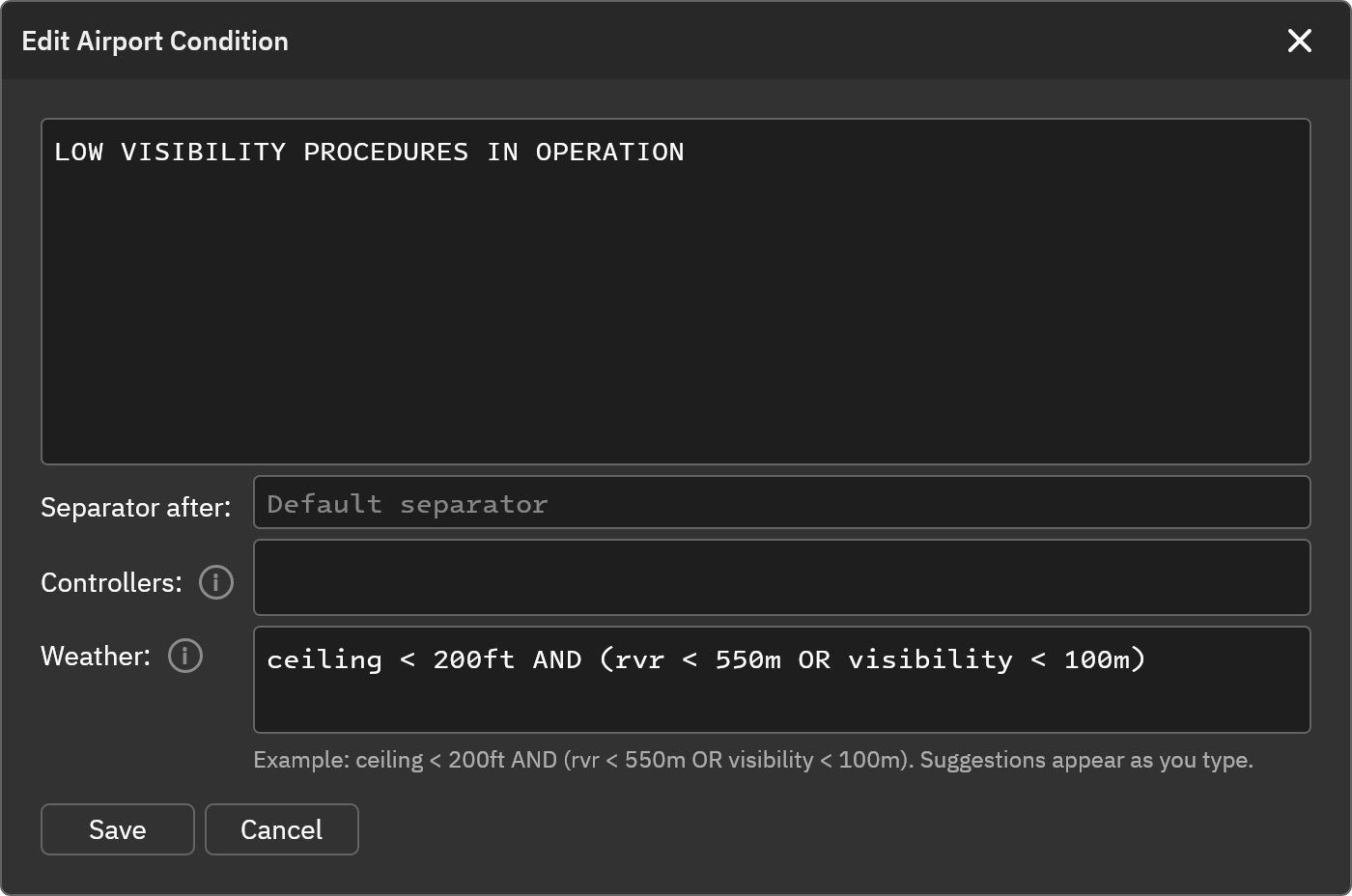
Type a condition in the Weather box. The message is included while the METAR meets the condition. A message with an empty Weather box is not affected by the weather.
A condition is made of comparisons, such as ceiling < 200ft, joined with AND and OR, negated with NOT, and grouped with parentheses:
ceiling < 200ft AND (rvr < 550m OR visibility < 100m)
Field names, units and keywords are not case-sensitive, and conditions can be spread over several lines. If the condition is not valid, vATIS shows what is wrong and where, and will not save the message until it is fixed.
Suggestions
vATIS suggests what can come next as you type: field names, comparisons, units and weather codes. The list appears as you type a word, after a space and after an opening parenthesis. Choose a suggestion with the arrow keys and press Enter or Tab, or double-click it. Typing anything else just closes the list, so your own text is never replaced. Typing trend, tempo or becmg lists the fields that can be read from a trend.
Comparisons with numbers
Write a field, a comparison, and a number with an optional unit. Without a unit, the first one listed for the field is used.
| Field | Also written | Compares | Units |
|---|---|---|---|
ceiling | Height of the ceiling: the lowest cloud layer of the types set as ceiling in the Clouds format (broken and overcast by default). Vertical visibility (VV) always counts as a ceiling. With no ceiling (clear skies, or only few or scattered clouds) the ceiling is unlimited, so ceiling > 1000ft is met and ceiling < 1000ft is not |
ft, m
| |
cloudbase | Height of the lowest cloud layer of any coverage. Unlimited when the sky is clear |
ft, m
| |
rvr | The lowest runway visual range reported. A variable RVR such as 1800V3000FT counts as its lowest value |
m, km, ft
| |
visibility | vis | Prevailing visibility. CAVOK counts as 9999 m |
m, km, ft, sm
|
windspeed | wind | Mean wind speed |
kt, kmh, mps
|
gust | windgust | Gust speed. Zero when no gust is reported |
kt, kmh, mps
|
winddir | winddirection | Mean wind direction. Variable winds (VRB) never match | deg |
temperature | temp | Air temperature |
c, f
|
dewpoint | dew | Dewpoint |
c, f
|
qnh |
pressure, altimeter
| The pressure setting, converted if the METAR uses the other unit |
hpa, inhg
|
depth | runwaydepth | The deepest deposit in the METAR’s runway condition groups. Zero when none is reported | mm |
The comparisons are < (below), <= (at or below), > (above), >= (at or above) and = (equals). The number is converted from the unit you write, so ceiling < 200ft works whether the METAR reports the ceiling in feet or in meters. Units can follow the number directly or after a space: 200ft and 200 ft are the same.
Both ICAO and US (FAA) METARs work with any unit. A visibility or rvr is converted to the unit you write, so visibility < 3sm is met by an ICAO METAR reporting 4000 as well as by a US METAR reporting 2SM. For visibility, statute miles (sm) can be written as a decimal or a fraction: visibility < 0.5sm, visibility < 1/2sm, or a mixed number such as visibility < 1 1/2sm.
Comparisons with codes
weather, recentweather, trendtype and cloudtype check for codes in the METAR, using INCLUDES or EXCLUDES:
| Field | Also written | Looks for |
|---|---|---|
weather | wx | Present weather codes for the current conditions, e.g. TS, FZRA, +SN, FG
|
recentweather | recentwx | Recent weather codes, e.g. RERA, RETSRA. See Trend and recent weather
|
trendtype | The type of the trend: TEMPO, BECMG or NOSIG. See Trend and recent weather
| |
cloudtype | Cloud types CB and TCU
|
weather INCLUDES TS is met while a thunderstorm is reported. To look for more than one code, separate them with commas, weather INCLUDES TS,FZRA, or put them in quotes, weather INCLUDES "TS FZRA". INCLUDES is met when any of the codes is found, and a code matches inside longer ones: RA matches -RA, +RA and TSRA. EXCLUDES is met when none of them is found.
Trend and recent weather
weather only looks at the current conditions in the METAR. The trend at the end of a METAR, such as TEMPO SHRA or BECMG 5000, and the recent weather, such as RERA, have their own fields so that a condition says exactly which one it means.
Trend. Put trend, tempo or becmg in front of a field name to read the trend instead of the METAR:
| Prefix | Reads |
|---|---|
trend | Any trend group in the METAR, whether TEMPO or BECMG
|
tempo | Only TEMPO groups |
becmg | Only BECMG groups |
These fields can be read from a trend, and they work with the same units, comparisons and codes as the METAR field they are named after:
| Field | Also written | Compares or looks for |
|---|---|---|
ceiling | Ceiling in the trend’s clouds, e.g. tempoceiling < 1000ft
| |
cloudbase | The lowest cloud layer in the trend | |
visibility | vis | Visibility in the trend, e.g. tempovisibility < 800m
|
windspeed | wind | Mean wind speed in the trend |
gust | windgust | Gust speed in the trend |
winddir | winddirection | Mean wind direction in the trend |
weather | wx | Weather codes in the trend, e.g. trendweather INCLUDES SHRA
|
cloudtype |
CB and TCU in the trend’s clouds, e.g. becmgcloudtype INCLUDES CB
| |
cavok | Whether the trend reports CAVOK |
rvr, temperature, dewpoint, qnh, depth and windshear are not part of a trend, so they have no trend version.
trendtype matches the type of the trend itself, e.g. trendtype INCLUDES TEMPO. To check the type and what the trend says together, use the prefixes instead, tempoweather INCLUDES RA: a METAR can have both a TEMPO and a BECMG group, and trendweather INCLUDES RA AND trendtype INCLUDES TEMPO is met when rain is in one group and a TEMPO is in the other.
A METAR can have up to two trend groups. A condition is met if any group it applies to meets it, but EXCLUDES is met only if none of them contains the code. If the METAR has no trend of that kind, or only NOSIG, a comparison is not met, and EXCLUDES is met.
Recent weather. recentweather looks for the recent weather group of the METAR, which starts with RE. The RE is optional, so recentweather INCLUDES RA and recentweather INCLUDES RERA both match RERA. As with weather, a code matches inside longer ones, so RA also matches RESHRA.
Conditions without a comparison
windshear is met while wind shear is reported, and cavok while the METAR reports CAVOK. Use NOT for the opposite, e.g. NOT cavok.
Note
A comparison is not met when the METAR does not report the value it needs. The exceptions are fields where a missing value means nothing is limiting. A METAR with no ceiling layer (CLR, SKC, NSC, CAVOK, or only few and scattered clouds) has an unlimited
ceiling, and with clear skiescloudbaseis unlimited too. With no RVR reported,rvris unlimited, sorvr > 550mis met andrvr < 550mis not. With no gust group,gustis zero, and with no runway deposit reported,depthis zero. UseNOTorEXCLUDESto test for something being absent. Before the first METAR has been received, no weather condition is met.
Combining comparisons
AND is evaluated before OR, as in ordinary logic, so
ceiling < 200ft AND rvr < 550m OR visibility < 100m
means (ceiling below 200 ft and RVR below 550 m) or visibility below 100 m. Use parentheses to change the order:
ceiling < 200ft AND (rvr < 550m OR visibility < 100m)
means the ceiling is below 200 ft, and either the RVR is below 550 m or the visibility is below 100 m. Parentheses can be nested, for example ((A OR B) AND C) OR D. NOT applies to the condition or group that follows it: NOT (windshear OR cloudtype INCLUDES CB).
Examples
Each row shows a different part of the condition language.
| Message | Weather condition | Shows |
|---|---|---|
| STRONG GUSTY WINDS | gust >= 30kt | A number field with a unit and >=
|
| CALM WIND | windspeed = 0kt | The = comparison |
| LOW CLOUD IN THE VICINITY | cloudbase < 500ft | The lowest cloud layer of any coverage, unlike ceiling
|
| LOW PRESSURE, CHECK ALTIMETER SETTING | qnh < 1000hpa | A pressure setting and its unit |
| STRONG WESTERLY WIND | winddir >= 240deg AND winddir <= 300deg AND windspeed >= 20kt | Wind direction, and AND with three comparisons |
| RWY CONTAMINATED | depth > 3mm | Runway deposit depth in millimeters |
| ICING POSSIBLE | temperature <= 3c AND dewpoint >= -3c |
<=, AND, and a negative number |
| FOG, EXPECT DELAYS | wx INCLUDES FG AND vis < 800m | The alternative field names wx and vis
|
| FOG, EXPECT DELAYS | wx INCLUDES FG AND vis < 1/2sm | Statute miles, with a fraction |
| THUNDERSTORMS IN THE VICINITY | weather INCLUDES TS OR cloudtype INCLUDES CB |
INCLUDES with weather and cloudtype, and OR
|
| DEICING NOT REQUIRED | temperature > 3c AND weather EXCLUDES "FZRA FZDZ" |
EXCLUDES with more than one code in quotes |
| SHOWERS POSSIBLE | weather INCLUDES SHRA OR trendweather INCLUDES SHRA | The current weather or any trend |
| TEMPORARY LOW VISIBILITY, EXPECT DELAYS | tempovisibility < 800m | A number field read from TEMPO groups only |
| CUMULONIMBUS EXPECTED | becmgcloudtype INCLUDES CB | A code field read from BECMG groups only |
| NO SIGNIFICANT CHANGE EXPECTED | trendtype INCLUDES NOSIG | The type of the trend |
| RUNWAY MAY BE WET | recentweather INCLUDES RA | Recent weather, with the optional RE left out |
| WINDSHEAR REPORTED ON FINAL | windshear | A condition without a comparison |
| VISUAL APPROACHES AVAILABLE | cavok |
cavok, also without a comparison |
| ILS APPROACHES IN USE | NOT cavok |
NOT in front of a condition: the opposite of the row above |
| NO WINDSHEAR OR CUMULONIMBUS REPORTED | NOT (windshear OR cloudtype INCLUDES CB) |
NOT in front of a group in parentheses |
| LOW VISIBILITY PROCEDURES IN OPERATION | ceiling < 200ft AND (rvr < 550m OR visibility < 100m) | Parentheses to group OR before AND
|
When Conditions Are Checked
- When a station is connected, the ATIS is rebuilt as soon as a new METAR arrives, or when a controller logging on or off changes which messages apply. vATIS only rebuilds when the set of included messages actually changes.
- The ATIS letter is not advanced by these changes. It advances for a new METAR in the usual way, but a controller logging on or off will update the ATIS text under the same letter.
- The free-form text area in the main window lists the static messages that currently apply, so you can see what will be broadcast.
- To force a conditional message into the ATIS without removing its condition, right-click the Airport Conditions or NOTAMs text box and use Quick Overrides. The override lasts until vATIS is closed.
- The Sandbox evaluates weather conditions against the METAR in its METAR field, and controller conditions against the current list of online controllers.